Prerequisites
Cut straight to the chase
The lectures from this week have been fairly easy and require brief explanations. This is why I’ve not added recap and lecture questions for this week. If next week remains almost the same as this week, I will most likely provide the cheatsheet again. There isn’t much content to go over, especially everything we’ve learned since the beginning will apply for the next couple of weeks until the end of semester.
Cheat sheet
Keep in mind that
ListBox,ReturnButton,Button,Input,FloatInput,Menu,MenuItem, &Windoware derived classes of Bobcat Widgetbobcat::Widgettl;dr they’re all bobcat widgets
Menu
Declaring menu type
// Application.h

class Application : public bobcat::Application_ {
	...
	bobcat::Menu *mainMenu;
}
Creating the component
// application.cpp
Application::Application() {
	...
	mainMenu = new Menu();
}
Where mainMenu is any name for the menu component and it’s a member of the class Application
Creating the menu item
// Application.h

class Application : public bobcat::Application_ {
	...
	bobcat::MenuItem *menuItem;
}
// application.cpp
Application::Application() {
...
menuItem = new MenuItem("File/Exit");
}Adding Menu Item to Menu
IMPORTANT TO KNOW IF YOU WANT THE MENU ITEM TO SHOW ON THE WINDOW TOOLBAR
// application.cpp
Application::Application() {
	...
	mainMenu = new Menu();

	menuItem = new MenuItem("File/Exit");

	mainMenu -> addItem(menuItem);
}
Where File is the first directory and Exit is the sub directory of File 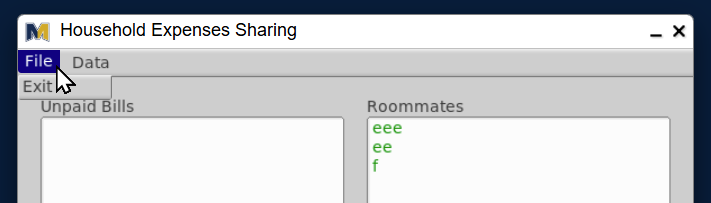
Setting up an ON CLICK event
Where Application::someClickFunction must be declared in the header file and defined anywhere in the cpp file
// Application.h

class Application : public bobcat::Application_ {
	...
	void someClickFunction(bobcat::Widget *sender);
};
// application.cpp
Application::Application() {
...
// After creating the components
ON_CLICK(menuItem, Application::someClickFunction);
}
void Application::someClickFunction(bobcat::Widget *sender) {
cout << "Widget " << sender->label() << " was clicked";
}ListBox
Declaring the component
// Application.h

class Application : public bobcat::Application_ {
	...
	bobcat::ListBox *anyListBox;
}
Creating the component
// application.cpp
Application::Application() {
	...
	anyListBox = new ListBox(int position_x, int position_y, int width, int height, position_y, width, height, "text");
}
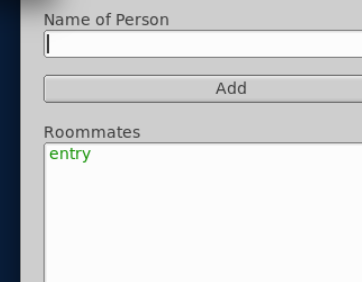
Adding entry to the component
// application.cpp
void Application::someRandomFunction() {
	anyListBox->add("entry");
}
Clearing the component
// application.cpp
void Application::someRandomFunction() {
	anyListBox->clear();
}
Input
There are two class types of Input:
// Application.h

class Application : public bobcat::Application_ {
	...
	bobcat::Input *textInput;
	bobcat::FloatInput *numberInput;
	bobcat::IntInput *intInput;
};
Creating the component
// application.cpp
Application::Application() {
	...
	textInput = new Input(int position_x, int position_y, int width, int height, "text");
	numberInput = new FloatInput(int position_x, int position_y, int width, int height, "text");
	intInput = new IntInput(int position_x, int position_y, int width, int height, "text");
}
Capturing cursor focus
// Application.cpp

void Application::anyRandomFunction() {
	textInput->take_focus();
	// OR
	numberInput->take_focus();
	// OR
	intInput->take_focus();
	// Doing another take focus on another input will focus on that input, not the first input that was called to take focus
}
Clearing the component
// application.cpp
void Application::someRandomFunction() {
	textInput->clear();
	// OR & AND
	numberInput->clear();
	// OR & AND
	intInput->clear();
}
Getting the value
// application.cpp
void Application::someRandomFunction() {
	textInput->value(); // gives a string value
	numberInput->value(); // gives a float or double value
	intInput->value(); // gives an integer valuea
}
Button
There are two types of buttons: ReturnButton allows the user to confirm their input when they hit the enter key on their keyboard
// Application.h

class Application : public bobcat::Application_ {
	...
	bobcat::Button *button;
	bobcat::ReturnButton *returnButton;
};
Creating the component
// application.cpp
Application::Application() {
	...
	button = new Button(int position_x, int position_y, int width, int height, "text");
	returnButton = new ReturnButton(position_x, position_y, width, height, "text");
}
Setting up an ON CLICK event
Where Application::someClickFunction must be declared in the header file and defined anywhere in the cpp file
// Application.h

class Application : public bobcat::Application_ {
	...
	void someClickFunction(bobcat::Widget *sender);
};
// application.cpp
Application::Application() {
...
// After creating the components
ON_CLICK(button, Application::someClickFunction);
}
void Application::someClickFunction(bobcat::Widget *sender) {
cout << "Widget " << sender->label() << " was clicked";
}TextBox
Declaring the component
// Application.h
class Application : public Bobcat::Application_ {
	...
	Bobcat::TextBox *textBox;
}
Creating the component
// application.cpp
Application::Application() {
	...
	textBox = new TextBox(int position_x, int position_y, int width, int height, "text");
}
Changing the text
void Application::anyRandomFunction() {
	textBox->label("anything you desire");
}
Window
Declaring the window
// Application.h

class Application : public bobcat::Application_ {
	...
	bobcat::Window *window;
};
Creating the window, defining UI components, & ending the window
You must end the window if you're done adding components for THAT WINDOW
// application.cpp
Application::Application() {
	window = new Window(int position_x, int position_y, int width, int height, "text");
	// VISUAL COMPONENTS here

	// AFTER VISUAL COMPONENTS DONE -- IMPORTANT TO KNOW
	window->end();

	// If it's the first window to show
	window->show();
}
Locking the window focus
Useful for focusing on the second window in front of the main window
void Application::someRandomFunction() {
	window->set_modal();
}
Vector
Declaring the vector
// Application.h

class Application : public bobcat::Application_ {
	...
	vector<type> vec;

	void anyRandomFunction();
};
Adding to the vector
// application.cpp
// Where anyRandomFunction is declared inside the class Application
void Application::anyRandomFunction() {
	...
	vec.push_back(any_value);
}